
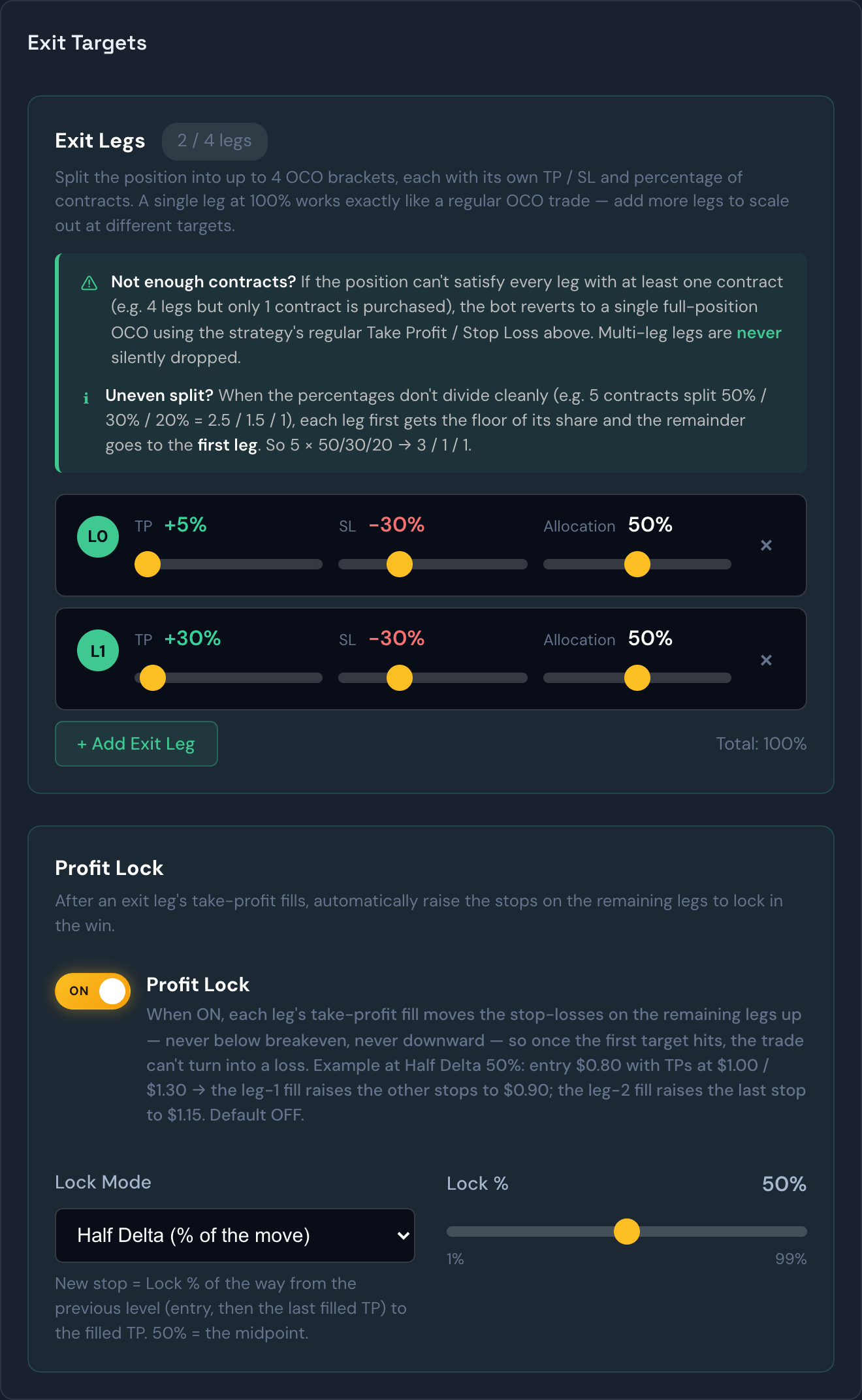
A multi-leg exit lets a single trade get out in stages instead of all at once. Rather than one profit target and one stop-loss for the whole position, you can split the exit into as many as four separate legs, each with its own take-profit, its own stop-loss, and its own share of the contracts. It's the bot's version of "sell a little here, sell a little higher, let the rest run."
You set this up on the Strategies page under Risk & Orders, in the Exit Legs section.
How it works
- You decide how many legs to use (up to four) and give each one a take-profit, a stop-loss, and a percentage of the position.
- The bot automatically splits your contracts across the legs to match those percentages. Any leftover contract that doesn't divide evenly is routed to the leg most likely to fill first.
- On the Live Trades page, the active trade card shows each leg live and updates as each one fills, so you can watch the position peel off in pieces.
- Once the trade is done, each leg gets a green ✓ or red ✗ based on whether that piece made or lost money.
Example
You hold 10 contracts and set four exit legs: sell 30% at +15%, another 30% at +25%, 25% at +40%, and let the final 15% ride with a −10% stop. As the price climbs, the bot books partial profits at each target along the way, and the last slice either reaches the highest target or stops out — so you lock in gains early without giving up all of the upside.
Tip
This is different from Multi-Tier Trailing. A trailing exit keeps the whole position together and tightens one stop as profit grows. Multi-leg exits break the position into parts with fixed targets. Some traders even combine the ideas — use multi-leg exits to scale out, with a trailing stop on the final leg.
When there aren't enough contracts to go around
You can't split 1 contract four ways. If an entry fills with fewer contracts than you have legs — because that's all your capital allowed, or the option was expensive — the bot arms as many legs as it can afford, starting with the ones nearest to filling, and skips the rest for now.
If you later Scale In and grow the position, those skipped legs are put back, priced off your new blended average entry. That only happens while none of your legs has closed yet; once a leg has taken profit, the trade keeps the leg structure it's running so your booked result never changes underneath you.
Example
Your strategy has 3 exit legs, but the entry could only afford 1 contract, so only the first leg was armed. You scale in to 4 contracts. Legs 2 and 3 are re-created at your new average entry, so a pullback now only takes part of the position instead of ending the whole trade on one stop.
Profit Lock
Profit Lock is an optional add-on for multi-leg exits: the moment one leg's take-profit fills, the stop-losses on your remaining legs are automatically raised to protect the win. Once the first target hits, the trade can't turn into a loss.
You'll find the toggle in the same Exit Targets area, in its own box right below the exit legs — it appears once your strategy has two or more legs (and isn't using a trailing exit, which manages its own stop). It's off by default and saved per strategy.
Two promises, always:
- Never below breakeven. A raised stop is never placed below the price you paid to get in.
- Only ever up. Each filled target can only tighten your protection further — a stop never moves back down.
The Lock % slider decides how much of the win to protect, in one of two styles:
- Half Delta (% of the move) — the default. The new stop lands part-way along the move that just paid off. At 50%, that's the midpoint: enter at $0.80, first target fills at $1.00, and the remaining stops rise to $0.90.
- % Below Filled TP — the new stop sits a fixed percentage below the target that just filled. At 10%, a $1.00 fill puts the new stop at $0.90.
Example
You enter at $0.80 with two legs — targets at $1.00 and $1.30 — and Profit Lock on at 50%. Leg 1 fills at $1.00, and leg 2's stop is raised to $0.90, already above your entry. If the price keeps running, leg 2 exits at $1.30; if it falls apart, leg 2 exits at $0.90. Either way you finish green.
Tip
A higher Lock % protects more of the win but gives the remaining legs less room to breathe — they'll stop out on smaller pullbacks. If your later targets are far away, a gentler Lock % (30–50%) leaves room for the ride.
Tip
Not sure whether Profit Lock helps your strategy? Test it first. The Backtest page can run your exact leg setup with Profit Lock on and off over past alerts, so you can see the difference before turning it on live.