
You can move between subscription tiers — up or down — without losing your settings or your trade history.
Where to go
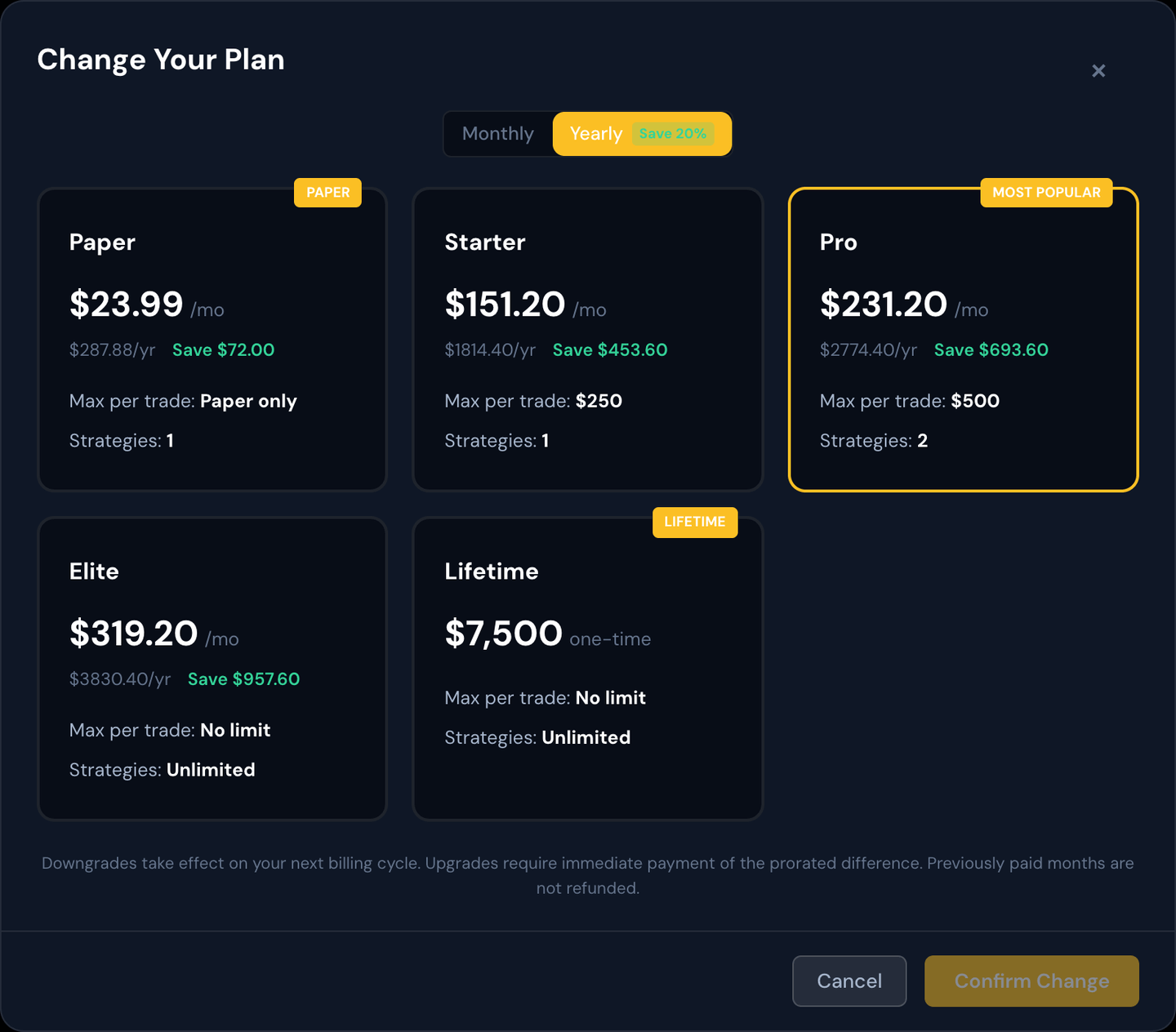
Open Billing in the sidebar. Click Change Plan to see a comparison of every available tier with the features each one includes.
Upgrading
An upgrade is a move to a higher tier (more strategies allowed, more features unlocked, etc.).
- It takes effect immediately.
- You're charged a prorated amount for the rest of the current billing period — that is, only the portion of the new tier's price that covers the days remaining until your next billing date.
- Your next billing date stays the same. On that date, you'll be charged the full new amount going forward.
Downgrading
A downgrade is a move to a lower tier.
- It takes effect at the end of the current billing period — not immediately. You keep using the higher-tier features you've already paid for until the period runs out.
- A banner on the Billing page reminds you when the new tier kicks in.
- No money changes hands until your next billing date, at which point the lower price is what you're charged.
Switching monthly ↔ yearly
Most tiers can be paid monthly or yearly. Yearly is typically discounted (around 20%). Switching between monthly and yearly is treated the same way as a downgrade/upgrade — it follows the same proration / next-cycle rules above.
Paper vs live tiers
The Paper tier is the entry plan: your bot runs on a simulated (paper) account only and can't place real trades. The three live tiers — Starter, Pro, and Elite — unlock real trading through your connected brokerage.
- Upgrading from Paper to a live tier works like any other upgrade. It takes effect immediately, you pay the prorated difference for the rest of the period, and your billing date stays the same. As soon as it goes through, the live-broker option unlocks — open Broker Settings and connect your brokerage to start trading live. Your bot restarts once during the switch, which is normal.
- Downgrading from a live tier back to Paper works like any other downgrade. You keep live trading until the end of your current billing period, then the account returns to paper-only and the live-broker option locks again.
Example: You're on Paper at $29.99/mo with 20 days left before your next bill, and you upgrade to Starter ($189/mo). You're charged only the prorated difference for those 20 days now, your billing date doesn't change, and the live-broker picker unlocks right away. Next month you're billed the full $189.
Note
Moving to a live tier doesn't start live trading on its own — it only unlocks the option. You still choose your broker and connect it under Broker Settings; until you do, your bot keeps paper trading. See Paper Trading for how paper mode works.
Upgrading to Lifetime
Lifetime is a one-time purchase, not a subscription. You pay once and are never billed again.
We credit up to 3 months of what you've been paying. As a loyalty reward, we take up to your last 3 months of subscription payments off the one-time Lifetime price. The billing page and the upgrade screen both show your exact discounted price before you pay, so there are no surprises.
- Your current monthly or yearly subscription is cancelled automatically right after the payment goes through, so you won't see another recurring charge.
- Lifetime includes full live automation. If you were on Paper Automation, upgrading to Lifetime unlocks live trading the same way a live-tier upgrade does. Connect your brokerage under Broker Settings to start.
- Lifetime is permanent: there's no downgrade from it, so the plan options are hidden once you're on it.
Example: You've been on Starter ($189/mo) for the last 3 months and Lifetime is $7,500. We credit 3 × $189 = $567, so you pay $6,933 once. Your Starter subscription stops immediately and you never get another bill. If you switched tiers during those months, each month is credited at whatever plan you were on then. Yearly members get 3 months credited at their monthly-equivalent rate.
Cancelling entirely
If you want to stop the subscription, the Manage in PayPal link on the Billing page takes you to your provider's cancellation flow. Your portal access continues until the end of the period you've already paid for, then the account moves to deactivated status (see "License Status").
Tip
If you're unsure whether you need a higher tier, look at the Strategies page for your current count vs the max your tier allows. If you've been pinned to the max and have ideas you can't run, an upgrade may pay for itself.